Lighting console
Free lighting console for your laptop
VIMERA Light Console is a full lighting desk that runs on your laptop. Patch, cues, effects, timecode, a 3D stage with smoke and a lighting plot. Free, with no account and no time limit.
Windows 10 and 11 · macOS 13 or later
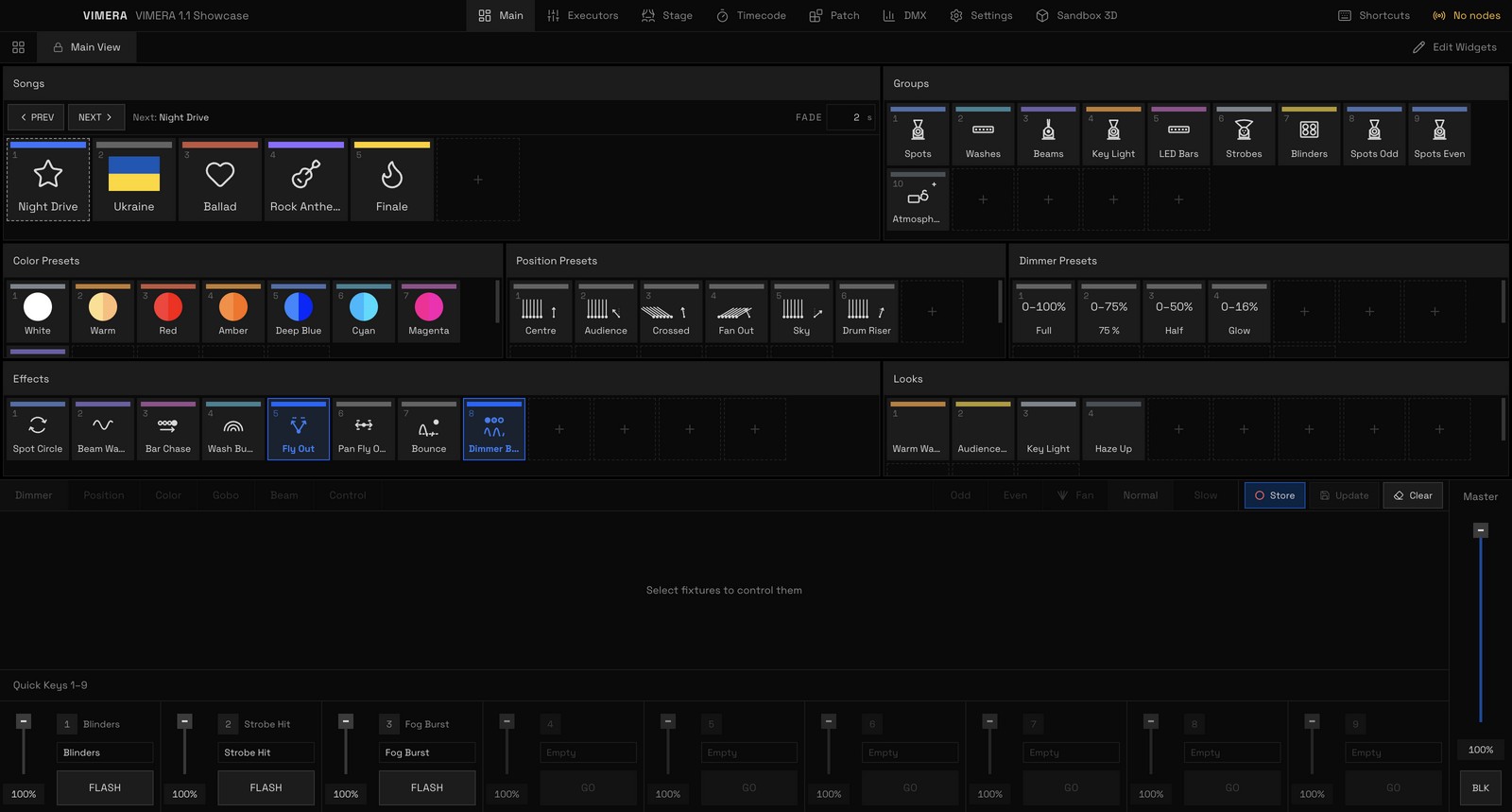
What you get for free
Free is not a cut-down edition. Everything in the desk is there from the start:
- Patch. GDTF profiles from Robe, Clay Paky, Martin, GLP, Ayrton, Chauvet and over a hundred other makers are already inside. Drop in your own .gdtf.
- Programming. A programmer with colour for RGB, RGBW, CMY and colour wheels, colour, position and dimmer presets, groups.
- Cue lists. Go, Follow and Time triggers, separate position and dimmer times, time spread across fixtures.
- Effects. 20 templates: chase, circle, figure 8, rainbow, random chase and more. Speed in beats, symmetric
<>and><, wings, groups, blocks. - Timecode. MIDI (MTC) and Art-Net input, song markers from Reaper, the show frame by frame to the track.
- 3D stage. Truss, decks, LED walls, PA and audience from the library. Real beams, smoke from fog machines, 4K stills.
- Lighting plot. One button turns the stage into a drawing on paper, with fixture numbers, truss and a fixture schedule.

Honestly, about output to fixtures
You can program, run the show to music and show it to the client in 3D without any hardware at all. To send light to real fixtures you need a VIMERA DMX Node.
The node is the licence. No serial numbers, no subscription: plug the node into the same network as the laptop, choose a universe for each output, and the fixtures are live. Two models, two and four universes, with isolated DMX outputs. On sale very soon.
The desk sends light only to VIMERA nodes, over its own encrypted link. Third-party Art-Net and sACN interfaces are not supported for output; Art-Net is used only as an input, for timecode.
Who it is for
- Lighting designers who want to prepare the show at home, not at the venue an hour before doors.
- Clubs and bars with a few heads and LED bars that want a show to the music without an expensive desk.
- Bands and DJs who tour a set and want the same light every night, on timecode.
- Rental companies that need to show the client a render and a plot before load-in.
- Students and beginners: learn on a desk where everything is visible in 3D, without a single fixture.

<>: the left half and its reflection.Get started in five minutes
- Download the installer for Windows or the disk image for macOS from the download section and install it.
- If Windows shows "Windows protected your PC", click More info, then Run anyway. You only do this once. On a Mac, click Allow when macOS asks about devices on your local network.
- Create a new show and add fixtures on the Patch page.
- Open Sandbox 3D, hang the fixtures on a truss and store your first cues.
- Watch Lesson 0: a tour of the desk in a few minutes.
Questions
Is it really free?
Yes. The whole desk is free, with no time limit and no account: patch, cues, effects, timecode, the 3D stage, the lighting plot and show files. You pay only for a VIMERA DMX Node, when you want to light real fixtures.
Can I program a show without a node?
Yes. Build the stage in 3D, program every cue, rehearse it on timecode and show it to the client. When you have a node, assign its outputs and the show is on the fixtures.
Does it work with my Art-Net or sACN interface?
No. The desk sends light only to VIMERA DMX Nodes, over its own encrypted link. Art-Net is used only as an input, for timecode.
Which computers does it run on?
Windows 10 and 11, 64-bit, and macOS 13 or later on Apple silicon and Intel Macs. For the 3D stage with smoke a recent graphics card helps; on a weaker laptop lower the 3D quality.
My fixture is not in the library. What do I do?
The library has GDTF profiles from over a hundred makers. If yours is missing, download its .gdtf from the maker or from GDTF Share and drop it on the Patch page, or build a profile by hand in the fixture editor.
Try it today
Download VIMERA Light Console and program your first show in 3D. Free.
Questions or ideas? Write to us on Instagram, @vimera.lighting.